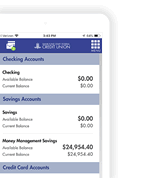
Coming Soon:A NEW Digital Banking Experience Designed Around You!
Soon you’ll have access to powerful new features
as part of the new Digital Banking experience
-

Accounts & Cards in
One Place
Manage accounts and cards in a
single app -

Alerts
Tailored to You
More alerts, more visibility, and more control over your finances -
Credit Score Monitoring Tool
Track your credit score to know where your financial health stands -

Enhanced Search Options
New ways to search transactions and account information, making it easier to manage your money. -

Financial Wellness Insights
Personalized tips and insights to help you save, spend smart, and reach your goals
Be Ready for Your First Login
Three Steps to Take Now to be
Ready
for your First Successful Login
 |
Remember your Digital Banking User
ID You'll need it to enroll in the new Digital Banking. |
 |
Have Your BankFund Member Number
Handy You can find it on the top right corner of your monthly account statement. |
 |
Update Your Contact Information Make sure your details are current before the new Digital Banking goes live. |
Questions and Answers
Will my login information remain the
same once the new Digital Banking launches?
All members will need to enroll in the new Digital Banking. You will need your current User ID, date of birth and member number.
Where can I find my member number to
enroll in the new Digital Banking?
Your member number can be found on the top right corner of your monthly statement available online or in paper (if you receive them by mail).
Do I still need the BFSFCU Cards
App?
With our new Digital Banking experience, you will be able to manage your cards and accounts in one convenient app. The current BFSFCU Cards app will be discontinued. If you are not already enrolled in Digital Banking, we strongly encourage you to enroll today.
Do I need to add my card alerts in the
new Digital Banking experience?
Will I need to set up my recurring
credit card payments again?
Yes, you will need to set up your recurring credit card payments in the new Digital Banking experience. You will also have the opportunity to review and reset your card alerts and controls, so everything is set up the way you want.
Will my recurring transfers between
BankFund accounts continue in the new Digital Banking?
Yes. Your recurring internal transfers between BankFund accounts will carry over automatically, so you do not need to set them up again.
Will I need to reschedule wires I set
up in the old Digital Banking platform?
No. Any wires you already scheduled should carry over, so you do not need to reschedule them. They should not be affected by the move to the new Digital Banking experience.
Upcoming Educational Events
Seminar
Upcoming Launch of
New
Digital Banking:
Designed Around You
Date: Tuesday, October 6,
2026
Time: 10:30 AM
Location: 1725 I Street, NW Washington
DC 20006, 4th Floor
Register for Oct 6th
Webinars
Upcoming
Launch of
New
Digital Banking:
Designed Around You
Date: Thursday, October 8,
2026
Time: 10:30 AM
Date: Tuesday, October 13,
2026
Time: 9:00 AM
Register for Oct 13th
Quick
Chat Tables
-
Oct 13Tuesday, 12:00 PM to 2:00 PM
MC Cafeteria Table -
Oct 14Wednesday, 12:00 PM to 2:00 PM
IMF Cafeteria Table -
Oct 15Thursday, 12:00 PM to 2:00 PM
IFC Cafeteria Table
Not Using Digital Banking Yet?
Enroll Today and Be Ready for our New Digital Banking Experience!
To
enroll you will need your member number, your date of birth,
& a temporary PIN.
To obtain your temporary PIN, please call
202-212-6400.

Yes. Quicken and QuickBooks access will be available approximately five days after launch.