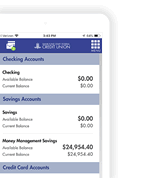
 Digital Banking

A NEWDigital Banking
Experience is Here!
You now have access to
powerful new features
as part of the new Digital Banking experience
Take a peek and see
where many of the tools are located.
-

Accounts & Cards in
One Place
Manage accounts and cards in a
single app -

Alerts
Tailored to You
More alerts, more visibility, and more control over your finances -

Credit Score Monitoring Tool
Track your credit score to know where your financial health stands -

Enhanced Search Options
New ways to search transactions and account information, making it easier to manage your money. -

Financial Wellness Insights
Personalized tips and insights to help you save, spend smart, and reach your goals
During Your First Login
 |
You can log in to Digital Banking through this website or
through the app. If using an Android device, be sure to download the
new BankFund app from Google Play.™ If using an iPhone, visit the App
Store® and make sure your current app is updated. 

|
|
Review your contact information and confirm your preferred phone number. |
|
Review and reset your alerts. |
|
If your card remained locked during the transition, send us a secure message or call us at +1 202-212-6400 for the initial unlocking of the card. |
Staying Safe
- Avoid logging in on public or unsecured Wi-Fi, such as at a coffee shop, airport, or hotel. Use your cellular data or a trusted private network instead.
- Never share your password or verification codes with anyone. BankFund will never ask you for them.
- Keep your device's operating system and the BankFund app up to date.
- Log out when you finish, especially on shared devices.
Questions and Answers
Can I use my current login information to
access the new Digital Banking?
All members will need to enroll in the new Digital Banking. You will need your current User ID, date of birth and member number.
Where can I find my member number to
enroll in the new Digital Banking?
Your member number can be found on the top right corner of your monthly statement. If you need assistance, please contact us at (202) 212-6400 or use our International Toll-Free Numbers.
Do I still need the BFSFCU Cards
App?
No. Your cards will automatically be available in the new Digital Banking experience so you will not need to reenter your card information. However, to help you stay in control and protect your cards, we recommend setting up all your card controls, notifications and alerts after your first login. The BFSFCU Cards App will no longer be available after November 2, 2026.
When do I need to log in to the new
Digital Banking?
After the new system launches, you can log in anytime. You will need your current Digital Banking user ID, password and your member number.
Do I need to reset my card alerts in the
new Digital Banking experience?
Yes, you will need to reset your card alerts in the new Digital Banking experience. Be sure to update your Contact Details with a confirmed, preferred telephone number under the Account Settings menu to be offered alerts via SMS.
Will my recurring transfers between
BankFund accounts continue in the new Digital Banking?
Yes. Your recurring internal transfers between BankFund accounts will carry over automatically, so you do not need to set them up again.
Will I need to reschedule wires I set up
in the old Digital Banking platform?
No. Any wires you already scheduled will carry over, so you do not need to reschedule them. They will not be affected by the move to the new Digital Banking experience.